 d31d9924a5
* feature(auth): replace clerk.com with custom auth

* minor fixes

* remove notification preferences

* decrease live events interval

fix(api): cookies..

# Conflicts:
#	.gitignore
#	apps/api/src/index.ts
#	apps/dashboard/src/app/providers.tsx
#	packages/trpc/src/trpc.ts
90 lines
2.3 KiB
Markdown
90 lines
2.3 KiB
Markdown

|
|
|
|
<p align="center">
|
|
<h1 align="center"><b>Openpanel</b></h1>
|
|
<p align="center">
|
|
An open-source alternative to Mixpanel
|
|
<br />
|
|
<br />
|
|
<a href="https://openpanel.dev">Website</a>
|
|
·
|
|
<a href="https://docs.openpanel.dev">Docs</a>
|
|
·
|
|
<a href="https://dashboard.openpanel.dev">Sign in</a>
|
|
·
|
|
<a href="https://go.openpanel.dev/discord">Discord</a>
|
|
·
|
|
<a href="https://twitter.com/OpenPanelDev">X/Twitter</a>
|
|
·
|
|
<a href="https://twitter.com/CarlLindesvard">Creator</a>
|
|
·
|
|
</p>
|
|
<br />
|
|
<br />
|
|
</p>
|
|
|
|
Openpanel is a powerful analytics platform that captures and visualizes user behavior across web, mobile apps, and backend services. It combines the power of Mixpanel with the simplicity of Plausible.
|
|
|
|
## Disclaimer
|
|
|
|
> Hey folks 👋🏻 Just a friendly heads-up: we're still in the early stages of this project. We have migrated from pages to app dir and made some major changes during the development of Openpanel, so everything is not perfect.
|
|
|
|
## Stack
|
|
|
|
- **Nextjs** - the dashboard
|
|
- **Fastify** - event api
|
|
- **Postgres** - storing basic information
|
|
- **Clickhouse** - storing events
|
|
- **Redis** - cache layer, pub/sub and queue
|
|
- **BullMQ** - queue
|
|
- **Resend** - email
|
|
- **Arctic** - oauth
|
|
- **Oslo** - auth
|
|
- **tRPC** - api
|
|
- **Tailwind** - styling
|
|
- **Shadcn** - ui
|
|
|
|
## Self-hosting
|
|
|
|
OpenPanel can be self-hosted and we have tried to make it as simple as possible.
|
|
|
|
You can find the how to [here](https://docs.openpanel.dev/docs/self-hosting)
|
|
|
|
**Give us a star if you like it!**
|
|
|
|
[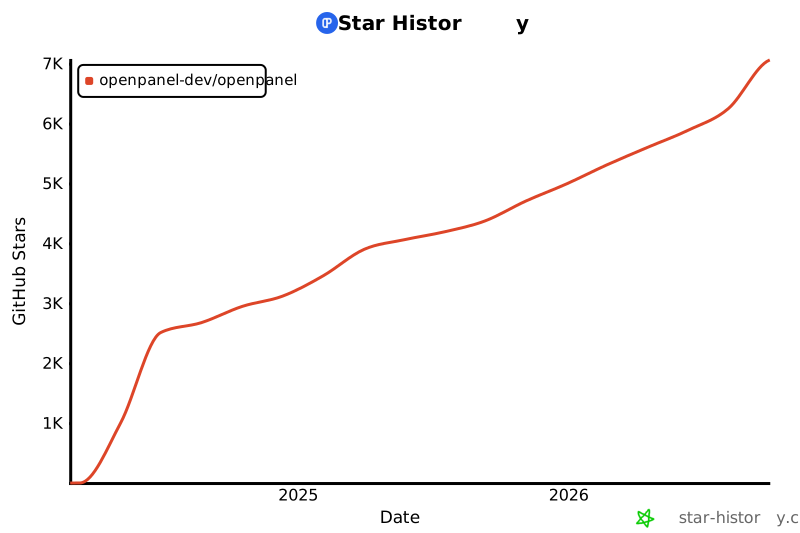](https://star-history.com/#Openpanel-dev/openpanel&Date)
|
|
|
|
## Development
|
|
|
|
### Prerequisites
|
|
|
|
- Docker
|
|
- Docker Compose
|
|
- Node
|
|
- pnpm
|
|
|
|
### Setup
|
|
|
|
Add the following to your hosts file (`/etc/hosts` on mac/linux or `C:\Windows\System32\drivers\etc\hosts` on windows). This will be your local domain.
|
|
|
|
```
|
|
127.0.0.1 op.local
|
|
127.0.0.1 api.op.local
|
|
```
|
|
|
|
### Start
|
|
|
|
```bash
|
|
pnpm dock:up
|
|
pnpm codegen
|
|
pnpm migrate:deploy # once to setup the db
|
|
pnpm dev
|
|
```
|
|
|
|
You can now access the following:
|
|
|
|
- Dashboard: https://op.local
|
|
- API: https://api.op.local
|
|
- Bullboard (queue): http://localhost:9999
|
|
- `pnpm dock:ch` to access clickhouse terminal
|
|
- `pnpm dock:redis` to access redis terminal |